

Exercise 1: Kernel isolation WeensyOS processes could stamp all over the kernel’s memory if they wanted. Better stop that. Change kernel, the kernel initialization function, so that kernel memory is inaccessible to applications—except for the memory holding the CGA console (the single page at (uintptr_t) console == 0xB8000).
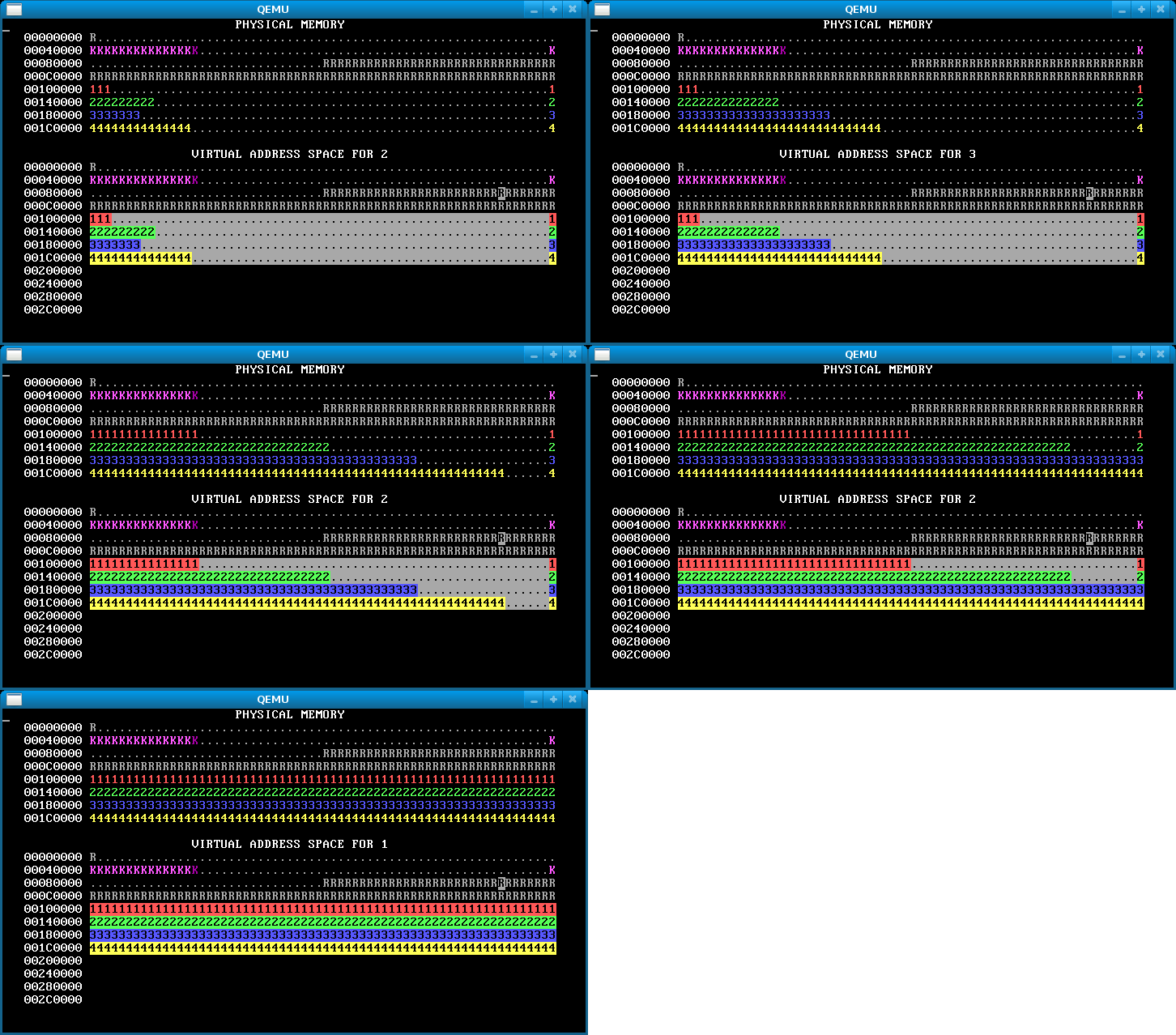
When you are done, WeensyOS should look like this. In the virtual map, kernel memory is no longer reverse-video, since the user can’t access it. Note the lonely CGA console memory block.
Hints:
- Use
virtual_memory_map. A description of this function is inkernel.h. You will benefit from reading all the function descriptions inkernel.h. - If you really want to look at the code for
virtual_memory_map, it is ink-hardware.c, along with many other grody hardware functions. - The
permargument tovirtual_memory_mapis a bitwise-or of zero or morePTEflags,PTE_P,PTE_W, andPTE_U.PTE_Pmarks Present pages (pages that are mapped).PTE_Wmarks Writable pages.PTE_Umarks User-accessible pages—pages accessible to applications. You want kernel memory to be mapped with permissionsPTE_P|PTE_W, which will prevent applications from reading or writing the memory, while allowing the kernel to both read and write. - Make sure that your
sys_page_allocsystem call is safe. Applications shouldn’t be able to usesys_page_allocto screw up the kernel. Similarly, if the application requests to allocate an address that is the last page in virtual memory space, you should arrange for the system call to return an error (this page will be used as the stack page later).
Exercise 2: Isolated address spaces
Implement process isolation by giving each process its own independent page table. Your OS should look like this:
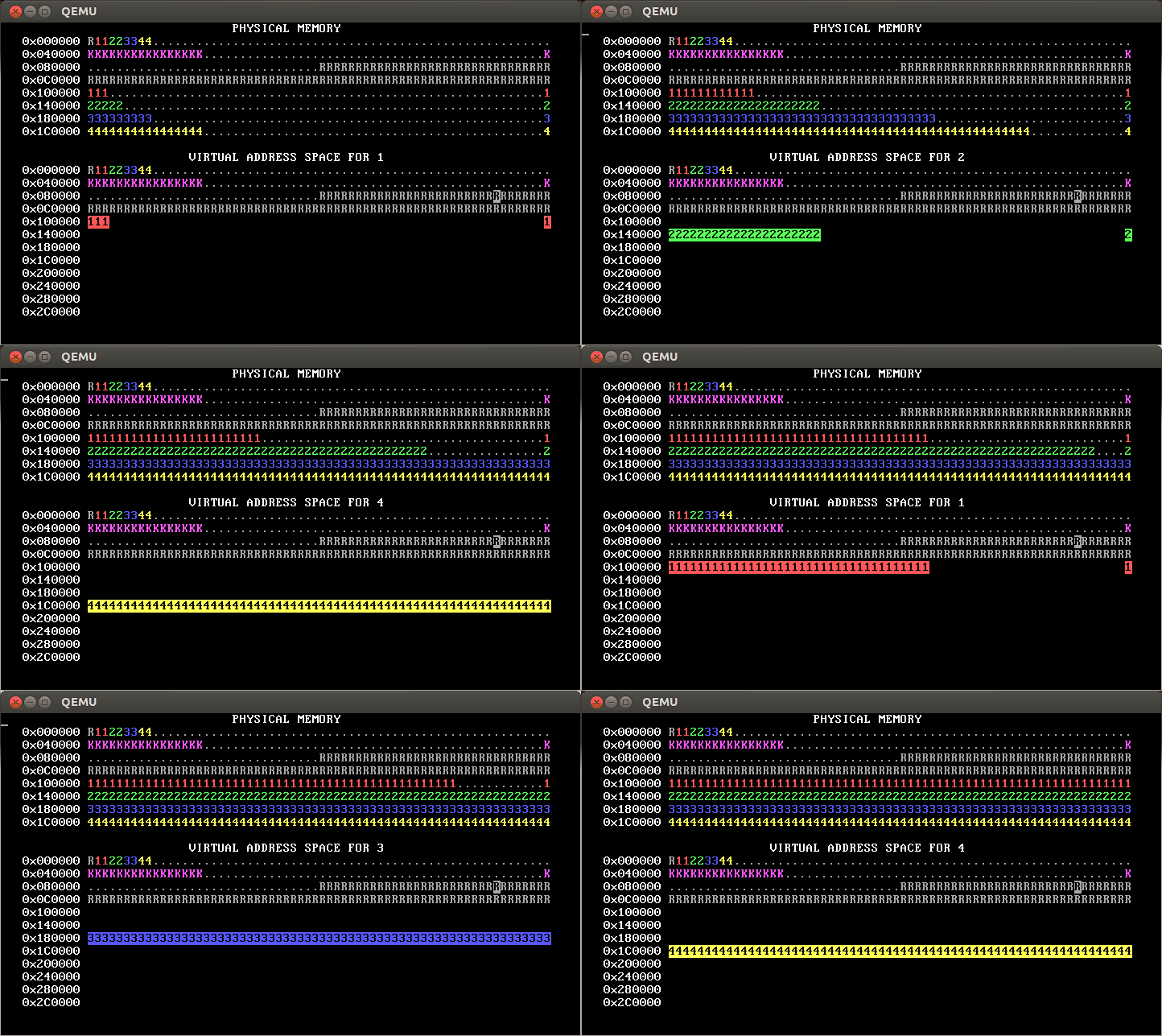
Thus, each process only has permission to access its own pages. You can tell this because only its own pages are shown in reverse video.
What goes in per-process page tables:
- Each process’s initial page table should be based on
kernel_pagetable. - The x86 architecture uses two-level page tables. A WeensyOS page table thus consists of two physical pages, one for the level-1 page table and another for a single level-2 page table. You must allocate both these pages. (In a larger operating system, there would be many level-2 page tables.) These pages should be owned by the process (should have
pageinfo[PN].owner == processid). - Because of a restriction in how
program_loadworks, you must use addresses in kernel address space (i.e., belowPROC_START_ADDR) for the initial processes’ page tables. - The level-1 page table is all 0, except that
pagetable->entry[0]should equal(x86_pageentry_t) address_of_new_l2_pagetable | PTE_P | PTE_W | PTE_U. You need to set this up yourself. - The initial mappings for addresses less than
PROC_START_ADDRshould be copied from those inkernel_pagetable. You can use a loop withvirtual_memory_lookupandvirtual_memory_mapto copy them. Alternately, you can copy the mappings from the kernel’s page table into the new page table usingmemcpy. This is faster, but make sure you copy the right data! - The initial mappings for the user area—addresses greater than or equal to
PROC_START_ADDR—should be inaccessible to user processes (thePTE_Ubit should be cleared in the corresponding page table entries). In our solution (shown above), these addresses are totally inaccessible (they are not mapped, so they show as blank). However, you can implement this differently (for example, by having the inaccessible addresses be mapped but not withPTE_Uprivilege); if you do that, your display will look different from the animated gifs throughout this lab description.
How to implement per-process page tables:
- Change
process_setupto create per-process page tables. - We suggest you write a
copy_pagetable(x86_pagetable* pagetable, int8_t owner)function that allocates and returns a new page table, initialized as a copy ofpagetable. This function will be useful in Exercise 5. Inprocess_setupyou can modify the page table returned bycopy_pagetableaccording to the requirements above. Your function can usepageinfoto find free pages to use for page tables. Read aboutpageinfoat the top ofkernel.c. - If you create an incorrect page table, it’s likely that WeensyOS will crazily reboot.
- Hint: The macros in
x86.hwill be handy, particularlyPTE_ADDR(see the section on “Address composition” above).
Exercise 3: Virtual page allocation
So far, WeensyOS processes use physical page allocation: the page with physical address X is used to satisfy the sys_page_alloc(X) allocation request for virtual address X. This is inflexible and limits utilization. Change the implementation of the INT_SYS_PAGE_ALLOC system call so that it can use any free physical page to satisfy a sys_page_alloc(X) request.
Your new INT_SYS_PAGE_ALLOC code must perform the following tasks.
- Find a free physical page using the
pageinfoarray. Return-1to the application if you can’t find one. Use any algorithm you like to find a free physical page; we just return the first one we find. - Record the physical page’s allocation in
pageinfo. - Map that physical page at the requested virtual address.
Don’t modify the physical_page_alloc helper function, which is also used by the program loader. You can write a new function if you want.
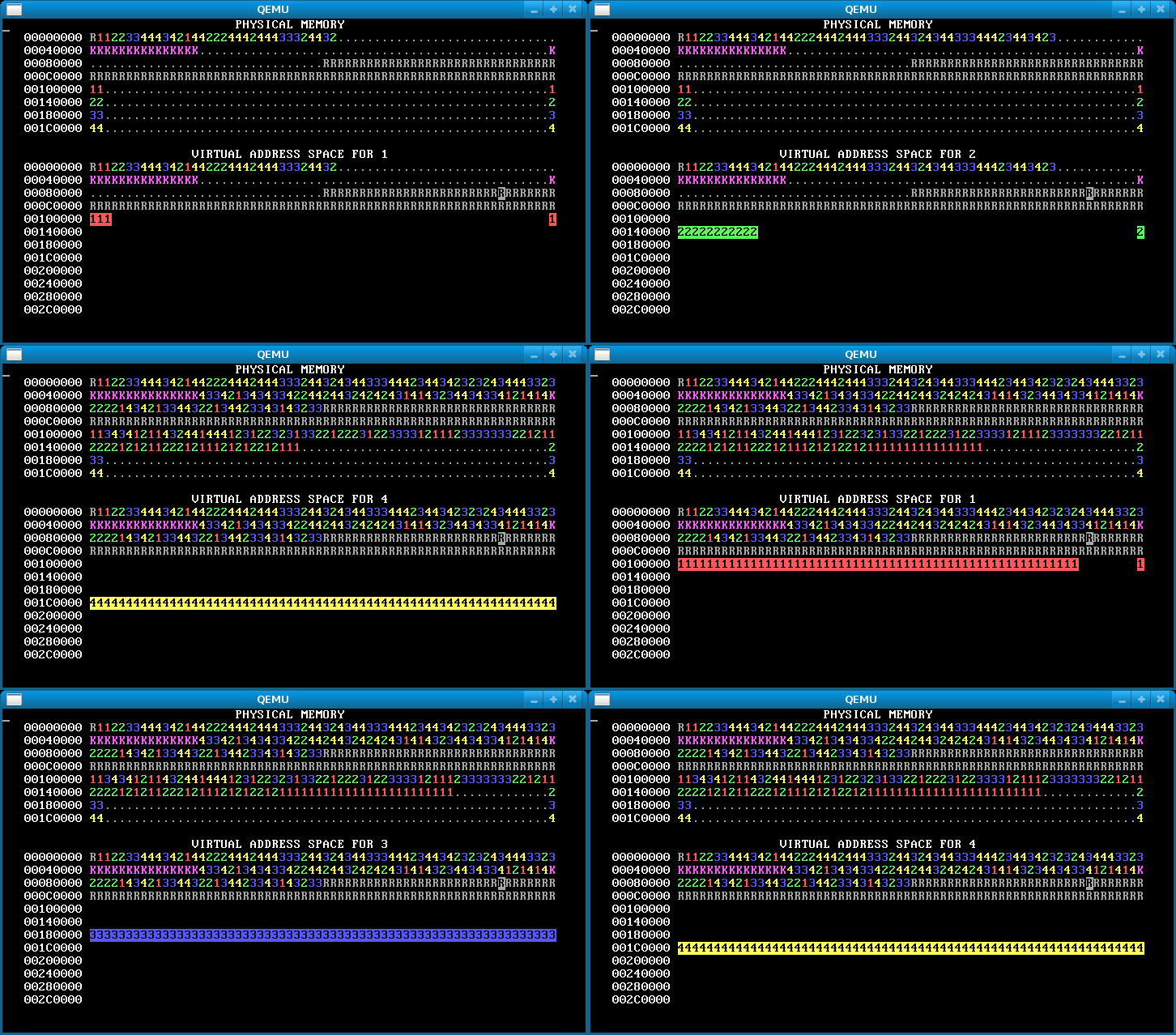
Here’s how our OS looks after this step.
Hints:
- Look at the other code in
kernel.cfor some hints on how to examine thepageinfoarray. - A physical page is free if
pageinfo[PAGENUMBER].refcount == 0.
Exercise 4: Overlapping address spaces
Now the processes are isolated, which is awesome. But they’re still not taking full advantage of virtual memory. Isolated address spaces can use the same virtual addresses for different physical memory. There’s no need to keep the four process address spaces disjoint.
In this step, change each process’s stack to start from address 0x300000 == MEMSIZE_VIRTUAL. Now the processes have enough heap room to use up all of physical memory!

If there’s no physical memory available, sys_page_alloc should return an error to the caller (by returning -1). (Our solution additionally prints “Out of physical memory!†to the console when this happens; you don’t need to.)
Exercise 5: Fork
We return in this exercise to a topic that we saw earlier in the semester: the fork() system call. In the first WeensyOS lab, you implemented a primitive version of fork. In this exercise, you will implement a more realistic fork; this one will actually give the new process a separate memory address space.
Backing up a bit, recall that fork is one of Unix’s great ideas. It starts a new process as a copy of an existing process. (fork returns in each process, the original and the copy.) To the child process, it returns 0. To the parent process, it returns the child’s process ID.
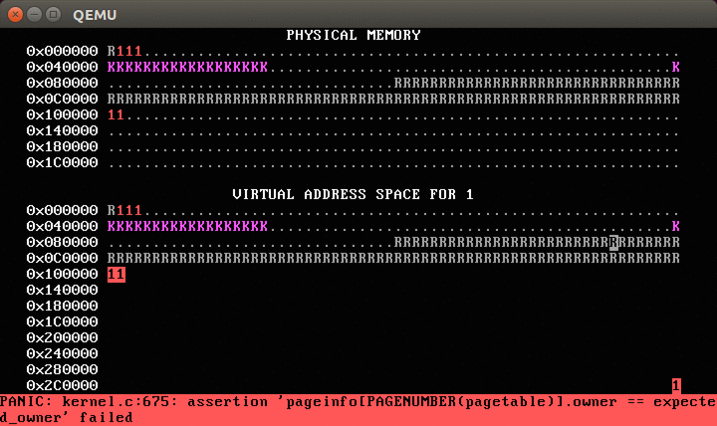
Now, run WeensyOS with make run or make run-console. At any time, press the ‘f’ key. This will soft-reboot WeensyOS and ask it to run a single p-fork process, rather than the gang of allocators. You should see something like this:
Your job now is to implement (most of) fork.
- We give you the basic structure of
fork. Specifically, we include the code that initializes the child process’s registers as a copy of the parent process’s registers (and setsreg_eaxto 0). We also include the code that looks for a free process slot in theprocesses[]array. (You implemented these things in the first WeensyOS lab.) If no slot exists,forkreturns-1to the caller. - If a free slot is found, you need to make a copy of
current->p_pagetable, the forking process’s page table, using yourcopy_pagetablefunction from earlier. - But you must also copy the process data in every application page shared by the two processes. The processes should not share any writable memory except the console (otherwise they wouldn’t be isolated). So
forkmust examine every virtual address in the old page table. Whenever the parent process has an application-writable page at virtual addressV, thenforkmust allocate a new physical pageP; copy the data from the parent’s page intoP, usingmemcpy; and finally map pagePat addressVin the child process’s page table. - Use
virtual_memory_lookupto query the mapping between virtual and physical addresses in a page table.
When you’re done, you should see something like this after pressing ‘f’.
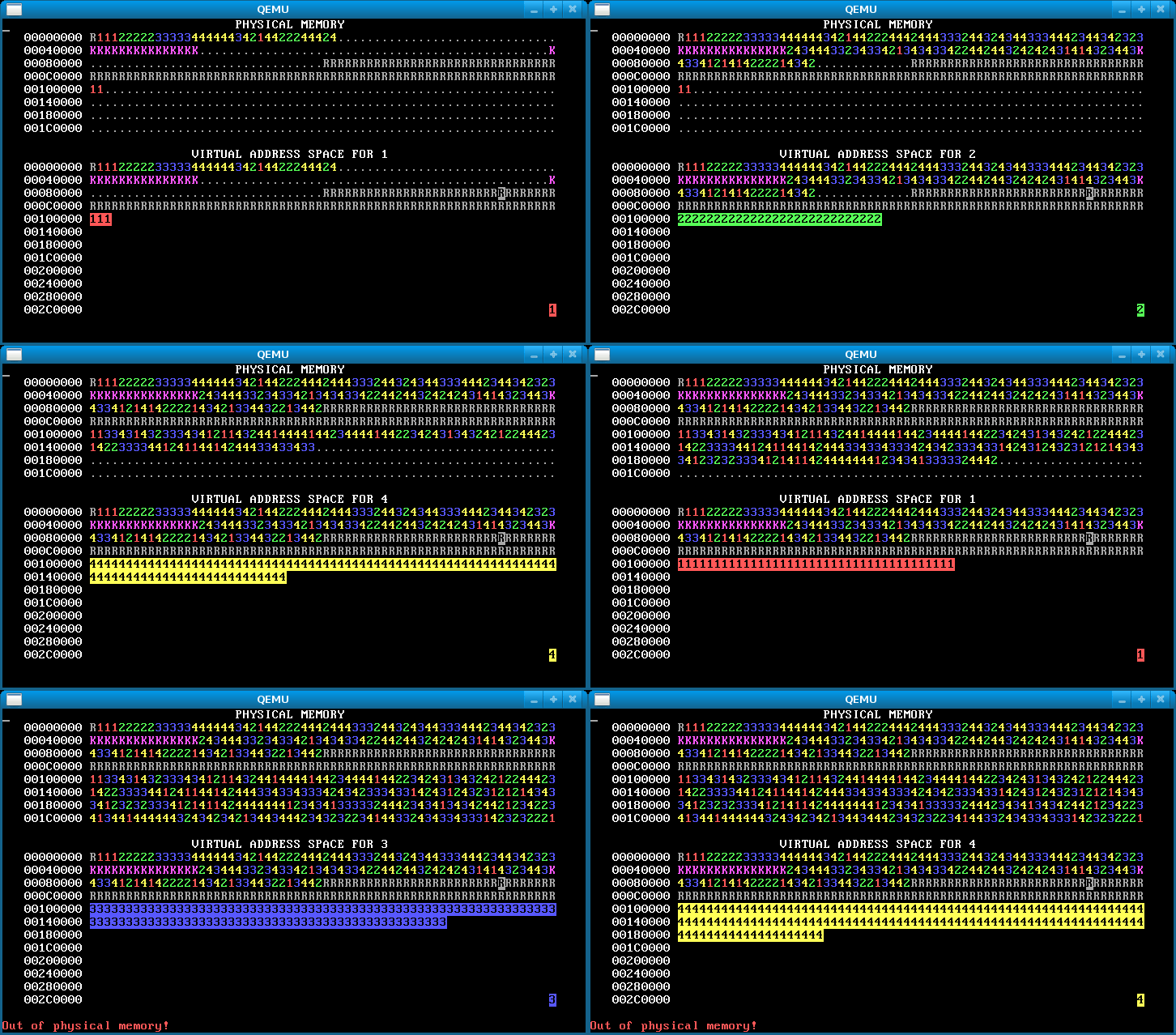
An image like this means you forgot to copy the data for some pages, so the processes are actually sharing stack and/or data pages:


0 comments