

Problem 1
Introduction
This problem is based on the article
Obermeyer, Z., Powers, B., Vogeli, C., & Mullainathan, S. (2019). Dissecting racial bias in an algorithm used to manage the health of populations. Science, 366(6464), 447-453.
In this article, the authors use patient medical records, demographics, and insurance claims to study bias in a machine learning model used to predict patient risk. This model has been used to make recommendations about which patients should be admitted to more intensive care programs on the basis of their health.
In this problem, you will replicate several of the qualitative findings from this study.
The results presented in this article were discussed by Dr. Ruha Benjamin in the video “Are We Automating Racism,” which was one of the videos we watched as part of our discussion of algorithmic bias in Week 8. You are free to consult either the article or the video when completing this assignment. While doing so may be interesting, it is not likely to concretely help you in the problems below.
Data Access
In order to protect patient privacy, the authors did not share the “real” data used in their study. Instead, they created a randomized version of the data that preserves many of the same patterns and trends. Run the cell below to access the data. I have also uploaded the CSV file directly to CCLE in case you have issues using this URL
import pandas as pd
url = “https://gitlab.com/labsysmed/dissecting-bias/-/raw/master/data/data_new.csv?inline=false”
df = pd.read_csv(url)
There are 48,784 patients represented as rows in the data, and 160 pieces of information about each patient represented as columns. Run the code below to check this
df.shape
risk_score_tis the algorithm’s risk score assigned to a given patient.cost_tis the patient’s medical costs in the study period.raceis the patient’s self-reported race. The authors filtered the data to include onlywhiteandblackpatients.gagne_sum_tis the total number of chronic illnesses presented by the patient during the study period.dem_femaleis a patient sex indicator, with1indicating female patients and0indicating male patients.
Run the code below to take a look at these columns.
part A
Here’s how the algorithm was used in the medical setting:
Patients with higher scores from the algorithm were more likely to be enrolled in “high-risk care management” programs.
A high-risk care management program offers additional health resources to patients, including trained healthcare providers to help them manage complex health needs. In other words,
If you are very sick, getting a high score on the algorithm can help you receive more medical attention.
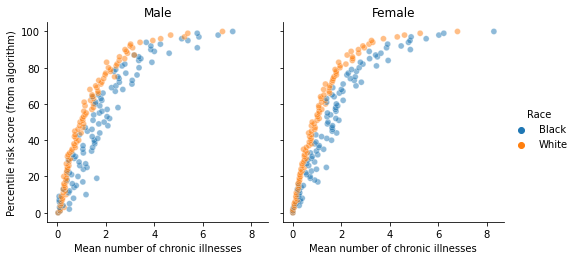
One of the major findings of the study above was that the algorithm tended to give lower scores to Black patients, even when those Black patients were equally sick as White patients. In this part, you will replicate this finding.
To do so, create the following plot:
Key Points
- The vertical axis gives the percentile risk of patients assigned by the algorithm, rounded to the nearest percentage point. A patient in the 85th percentile, for example, received a risk score from the algorithm higher than 84% of all patients and lower than 15% of all patients. The raw risk score (not the percentile) of each patient is contained in the
risk_score_tcolumn. - The horizontal axis gives the average number of chronic illnesses presented by patients in the corresponding risk percentile. For example, White men in the 80th risk score percentile presented, on average, approximately two chronic illnesses. The number of chronic illnesses presented by a patient is contained in the
"gagne_sum_t"column of the data. - Different colors segment Black and White patients (
race). Two panels distinguish between male and female patients. Thedem_femalecolumn gives the sex of each patient, with0representing male and1representing female.
Specs
Please attend to the following details:
- It is important that you round the percentile risk scores to the nearest percentile, and compute the average number of conditions within each rounded percentile. This means that, for example, there should be 101 data points (percentiles 0%-100%) corresponding to Black women, 101 other data points corresponding to White women, etc. Failure to round and compute the mean will result in your plot containing an unreadable number of points.
- The horizontal axis, vertical axis, and axis titles are all appropriately capitalized: the first letter of the first word is capitalized.
- The legend title, as well as the legend entries, are also appropriately capitalized.
- Beyond these specs, you are free to modify the colors, transparency, etc, and get creative with the text. You are not required to replicate the exact size or aspect ratio of the figure.
Hints
- The only columns you need to work with in this problem are:
risk_score_t,race,gagne_sum_t(containing the number of chronic illnesses per patient), anddem_female - The plotting aspect problem can be solved using either standard
matplotliborseaborn. Correct approaches using either set of tools will receive full credit. - The percentiles of an data frame column
df["x"]can be computed bydf["x"].rank()/len(df). The results will be values between 0 and 1. One should then multiply by 100 andround()the results to obtain the percentiles as integers between 0 and 100. - To compute the mean number of chronic illnesses per percentile, group by the integer percentiles (as well as race and sex) and then compute the
meanof thegagne_sum_tcolumn. - The plotted points should correspond to average number of chronic conditions, grouped by percentiles and
- part B
In no more than four sentences, describe the meaning of the plot you produced in Part A. For example, suppose that Patient A is Black, that Patient B is White, and that both Patient A and Patient B have exactly the same chronic illnesses. Are Patient A and Patient B equally likely to be referred to the high-risk care management program?
Next, you’ll perform an analysis to identify the source of this disparity in Black and White patients. You might imagine that the model was trained to base its risk scores on an “overall level of health” in the training data. However, it is very difficult to get data on such a concept.
For this reason, the algorithm studied was trained instead using total medical costs as the target variable. That is:
The risk score an agent receives is a function of the model’s prediction of the total medical costs which will be incurred by that individual.
This is a superficially logical choice, since (a) total medical costs are generally correlated with health and (b) costs are regularly recorded in insurance claims data.
In this problem, you’ll use linear regression to estimate the difference in generated medical costs between White and Black patients in this data set, and comment on this result in the context of Part A and B.
Note: The estimated cost disparity in the published paper is higher, over twice the result given here. This may reflect a methodological difference in their modeling or possibly be a byproduct of their data randomization.
step 1
If you modified the data frame df in any way in Part A, you should run the code below to reload the data frame.
# Step 1: run, do not modify
df = pd.read_csv(url)
step 2
Run this cell in order to limit the columns in the data frame to the ones you will use in this analysis.
Step 2: run, do not modify
cols = [‘cost_t’,
‘race’,
‘dem_female’,
‘dem_age_band_18-24_tm1’,
‘dem_age_band_25-34_tm1’,
‘dem_age_band_35-44_tm1’,
‘dem_age_band_45-54_tm1’,
‘dem_age_band_55-64_tm1’,
‘dem_age_band_65-74_tm1’,
‘dem_age_band_75+_tm1’,
‘alcohol_elixhauser_tm1’,
‘anemia_elixhauser_tm1’,
‘arrhythmia_elixhauser_tm1’,
‘arthritis_elixhauser_tm1’,
‘bloodlossanemia_elixhauser_tm1’,
‘coagulopathy_elixhauser_tm1’,
‘compdiabetes_elixhauser_tm1’,
‘depression_elixhauser_tm1’,
‘drugabuse_elixhauser_tm1’,
‘electrolytes_elixhauser_tm1’,
‘hypertension_elixhauser_tm1’,
‘hypothyroid_elixhauser_tm1’,
‘liver_elixhauser_tm1’,
‘neurodegen_elixhauser_tm1’,
‘obesity_elixhauser_tm1’,
‘paralysis_elixhauser_tm1’,
‘psychosis_elixhauser_tm1’,
‘pulmcirc_elixhauser_tm1’,
‘pvd_elixhauser_tm1’,
‘renal_elixhauser_tm1’,
‘uncompdiabetes_elixhauser_tm1’,
‘valvulardz_elixhauser_tm1’,
‘wtloss_elixhauser_tm1’,
‘cerebrovasculardz_romano_tm1’,
‘chf_romano_tm1’,
‘dementia_romano_tm1’,
‘hemiplegia_romano_tm1’,
‘hivaids_romano_tm1’,
‘metastatic_romano_tm1’,
‘myocardialinfarct_romano_tm1’,
‘pulmonarydz_romano_tm1’,
‘tumor_romano_tm1’,
‘ulcer_romano_tm1’]
df = df[cols]
step 3
The race column of the data is currently a string. Encode it using integer labels.
# Step 3: your code here
step 4
Partition the data into a target data y consisting of the cost_t column of df. Let the predictor data X contain all other columns, excluding cost_t.
# Step 4: your code here
step 5
Perform a train-test split of X and y, using 20% of the data as test data. Please pass the argument random_state = 2021 to your split function in order to ensure reproducibility.
Important: you should do this using only one function callStep5: your code here [] Step 6
Create a linear regression model and fit it to the training data. Evaluate the score of the model on the training and testing data. Here are the scores that I got — it’s ok if yours are a little different.
- Training score:
0.12629789734544883 - Testing score:
0.12415443228313183
step 6: your code here
step 7
Based the results above, comment on whether you are concerned about overfitting.
Note: these are not “accuracy” scores but rather “coefficient of determination” scores. They are relatively low, but low scores on statistical tasks are common in medical and biological applications.
[Your comment on overfitting here!]
step 8
Examine the coef_ attribute of the fitted linear regression model. The race column is the first one in the predictor data frame. This means that the very first entry of the coef_ array gives the model’s estimate of the difference in costs between White and Black patients when controlling for sex, age, and medical conditions. Here’s what I got — it’s ok if your answer is a little different:
- Coefficient of
race:579.9031747777375.
Step 8: your code here
step 9
Black patients in the US tend to generate lower medical costs than their equally-sick White counterparts, due to long-standing disparities in access to medical resources. Using your result from Step 8:
- State your estimate of the difference in medical costs between White and Black patients.
- Describe in no more than 4 sentences how your result would explain the disparities in risk scores from Part A.
[your discussion of your results here!]
Problem 2
.Introduction
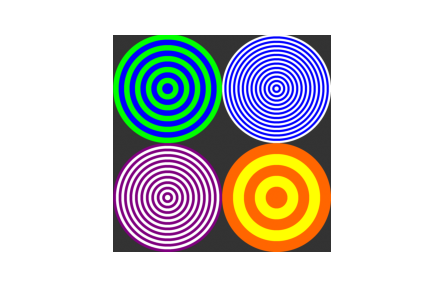
In this problem, you’ll use object-oriented programming and Numpy techniques to create simple graphics with bullseyes, like this one:
A Note on Loops
There is precisely one place in this entire problem in which a loop (such as a for-loop, a while-loop, or a list comprehension) is completely appropriate. This place is Part D. I’ll tell you when we get there. With that one exception, you should avoid the use of loops whenever possible. Solutions that use loops elsewhere will receive partial credit.
Concision and Style
Remember, concision and style are two of the criteria on which we assess your solutions. You should aim to write code that is as short, simple, and readable as possible. My own solution for this problem requires 21 lines excluding comments. Longer solutions are ok, as long as they don’t perform redundant computation and appropriately make use of Numpy operations.
Comments and Docstrings
Comments and docstrings are not required in any part of this problem. However,they may help us give you partial credit, so they are recommended unless you’re feeling very confident.
Input Checking
- It is not necessary to perform any input checking in this problem — you can assume that the user will supply inputs with the correct data types, shapes, etc.
Image Appearance
It’s ok for your images to look a little different from mine. For example, your image might appear slightly jagged or blocky, depending on the size of your background Canvas. That’s ok! As long as your image clearly demonstrates correct code, you’ll receive full credit.
part A
You don’t have to write any code here, just run the block below.
run this to get started
import numpy as np
from matplotlib import pyplot as plt
part B
Create a class Canvas, and implement two methods.
- The
__init__()method should take two arguments other thanself,backgroundandn.- The
backgroundis expected to be a 1d Numpy array of length 3, representing an RGB color. For example,black = np.array([0,0,0])andpurple = np.array([0.5, 0.5, 0]). - At this stage, the
__init__method should create an instance variableself.im, a Numpy array of shape(n, n, 3). This array should be constructed so thatself.im[i,j] == backgroundfor each value ofiandj.
- The
- The
show()method should take no arguments (except forself), and simply displayself.imusing theplt.imshow()function.
For example, the code
<code><span class="mtk1">purple = np.array([</span><span class="mtk7">0.5</span><span class="mtk1">, <span class="mtk7">0.0</span><span class="mtk1">, <span class="mtk7">0.5</span><span class="mtk1">])</span>
<span class="mtk1">C = Canvas(purple, <span class="mtk7">2001</span><span class="mtk1">) <span class="mtk8"># 2001 x 2001 pixels</span>
<span class="mtk1">C.show()</span></span></span></span></span></code>
should display a purple square, like this one:

Make sure to run the test block after your class definition in order to demonstrate that your code works.
Notes
- You can use
ax.axis("off")to remove the axis ticks and borders, although that’s not required for this problem. - For me, the easiest way to create
self.imwas to create an array of appropriate dimensions usingnp.zeros(), and then populate it using array broadcasting. - This problem can be solved using a loop for partial credit.
- define your Canvas class here
# solutions to Parts B, C, and D should all be in this cell
# test code: run but do not modify
purple = np.array([0.5, 0, 0.5])
C = Canvas(purple, 2001) # 2001 x 2001 pixels
C.show()
Part C
Modifying your class above (that is, not copy/pasting code), implement a method called add_disk(centroid, radius, color), which draws a colored disk with specified radius, centered at centroid, of the specified color.
centroidmay be assumed to be a tuple, list, or Numpy array of the form(x,y), wherexgives the horizontal coordinate of the disk’s center andygives the vertical coordinate.- All points within distance
radiusof thecentroidshould be filled in withcolor.
For example, the code
<code><span class="mtk1">purple = np.array([</span><span class="mtk7">.5</span><span class="mtk1">, <span class="mtk7">0</span><span class="mtk1">, <span class="mtk7">.5</span><span class="mtk1">])</span>
<span class="mtk1">white  = np.array([</span><span class="mtk7">1</span><span class="mtk1">, <span class="mtk7">1</span><span class="mtk1">, <span class="mtk7">1</span><span class="mtk1">])</span>

<span class="mtk1">C = Canvas(background = purple, n = <span class="mtk7">2001</span><span class="mtk1">)</span>
<span class="mtk1">C.add_disk((</span><span class="mtk7">1001</span><span class="mtk1">, <span class="mtk7">1001</span><span class="mtk1">), <span class="mtk7">500</span><span class="mtk1">, white)</span>
<span class="mtk1">C.show()</span></span></span></span></span></span></span></span></code>
should produce the following image:

Run the test code supplied below to demonstrate that your code is working.
Math Note
Recall that the (open) disk of radius
Programming Notes
- The function
np.meshgridis a useful way to represent the horizontal and vertical coordinates. If you take this approach, you should ensure that this function is called only once even if your user callsself.add_disk()multiple times. - This problem can be solved using a loop for partial credit.
- If you do take the loop-based approach for partial credit, you may need to reduce
n, the size of theCanvas, in the examples below, as your code might be slower.#
#test code: run but do not modify
purple = np.array([.5, 0, .5])
white = np.array([1, 1, 1])
C = Canvas(background = purple, n = 2001)
C.add_disk((1001, 1001), 500, white)
C.show()
Part D
Modify your code from Part B (still no copy/paste), write a method called add_bullseye(centroid, radius, color1, color2, bandwidth). This method should create a bullseye pattern consisting of concentric circles with alternating colors. Each circle should have thickness equal to bandwidth, and the radius of the entire pattern should be equal to radius. For example:
<code><span class="mtk1">purple = np.array([</span><span class="mtk7">0.5</span><span class="mtk1">, <span class="mtk7">0.0</span><span class="mtk1">, <span class="mtk7">0.5</span><span class="mtk1">])</span>
<span class="mtk1">white  = np.array([</span><span class="mtk7">1.0</span><span class="mtk1">, <span class="mtk7">1.0</span><span class="mtk1">, <span class="mtk7">1.0</span><span class="mtk1">])</span>
<span class="mtk1">grey   = np.array([</span><span class="mtk7">0.2</span><span class="mtk1">, <span class="mtk7">0.2</span><span class="mtk1">, <span class="mtk7">0.2</span><span class="mtk1">])</span>

<span class="mtk1">C = Canvas(background = grey, n = <span class="mtk7">2001</span><span class="mtk1">)</span>
<span class="mtk1">C.add_bullseye((</span><span class="mtk7">1001</span><span class="mtk1">, <span class="mtk7">1001</span><span class="mtk1">), <span class="mtk7">500</span><span class="mtk1">, purple, white, bandwidth = <span class="mtk7">50</span><span class="mtk1">)</span>
<span class="mtk1">C.show()</span></span></span></span></span></span></span></span></span></span></span></code>

In this example, each of the bands is 50 pixels thick, and the entire pattern has radius 500.
Loops
In this part, it would be appropriate to write one for– or while-loop.
Hint
You might wish to create a new cell and run the following code — it could help you catch on to the right idea.
<code><span class="mtk1">purple = np.array([</span><span class="mtk7">0.5</span><span class="mtk1">, <span class="mtk7">0.0</span><span class="mtk1">, <span class="mtk7">0.5</span><span class="mtk1">])</span>
<span class="mtk1">white  = np.array([</span><span class="mtk7">1.0</span><span class="mtk1">, <span class="mtk7">1.0</span><span class="mtk1">, <span class="mtk7">1.0</span><span class="mtk1">])</span>
<span class="mtk1">grey   = np.array([</span><span class="mtk7">0.2</span><span class="mtk1">, <span class="mtk7">0.2</span><span class="mtk1">, <span class="mtk7">0.2</span><span class="mtk1">])</span>

<span class="mtk1">C = Canvas(background = grey, n = <span class="mtk7">2001</span><span class="mtk1">)</span>
<span class="mtk1">C.add_disk((</span><span class="mtk7">1001</span><span class="mtk1">, <span class="mtk7">1001</span><span class="mtk1">), <span class="mtk7">500</span><span class="mtk1">, purple)</span>
<span class="mtk1">C.add_disk((</span><span class="mtk7">1001</span><span class="mtk1">, <span class="mtk7">1001</span><span class="mtk1">), <span class="mtk7">450</span><span class="mtk1">, white)</span>
<span class="mtk1">C.show()</span></span></span></span></span></span></span></span></span></span></span></span></code>
#test code: run but do not modify
purple = np.array([0.5, 0.0, 0.5])
white = np.array([1.0, 1.0, 1.0])
grey = np.array([0.2, 0.2, 0.2])
C = Canvas(background = grey, n = 2001)
C.add_bullseye((1001, 1001), 500, purple, white, bandwidth = 50)
C.show()
Part E
Write a further demonstration of the correct functioning of your code by creating a new Canvas with at least three bullseyes drawn on it. You should demonstrate:
- At least three (3) different centroids.
- At least four (4) different colors.
- At least three (3) different values of the
bandwidthparameter.
You’re also welcome to vary the radius parameter, but this isn’t required.
You’re encouraged to be creative! Coordinate your colors, let your bullseyes partially intersect, etc. etc. But if you’re not really feeling your artistic mojo today, it’s ok to base your solution on the example shown at the very beginning of this problem, which satisfies all of the above criteria. I’ve predefined the colors I used for your convenience.
Provided that you’ve solved up to Part D correctly, no further modifications to your Canvas class are required.
#predefined colors — feel free to add your faves!
purple = np.array([.5, 0, .5])
white = np.array([1, 1, 1])
green = np.array([0, 1, 0])
blue = np.array([0, 0, 1])
orange = np.array([1, .4, 0])
yellow = np.array([1, 1, 0])
grey = np.array([.2,.2,.2])
# write your demonstration here
# don’t forget to show the image!

0 comments